
WPRentals Theme Documentation WPRentals Theme Documentation

  • Client Support
  • Video Tutorials
  • WPRentals
  • WPEstate
  • API
Home / Technical how to / Technical – How to force user login on contact form

Technical – How to force user login on contact form

8005 views

Updated in January 2024 for latest theme versions

By default, a non logged user can contact any listing owner. If you want to force users to be logged in before contact property owner you need to do this change.

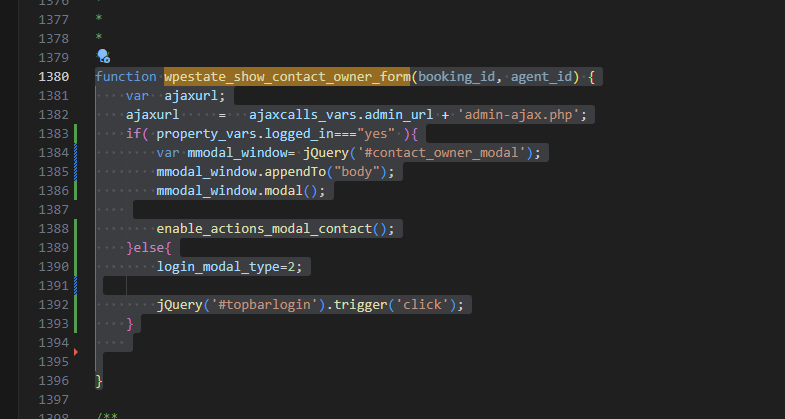
In wprentals/js/property.js , function wpestate_show_contact_owner_form  (around like 1380) you must add the below code

function wpestate_show_contact_owner_form(booking_id, agent_id) {

	var  ajaxurl;
	ajaxurl     =   ajaxcalls_vars.admin_url + 'admin-ajax.php';
	if( property_vars.logged_in==="yes" ){
	var mmodal_window= jQuery('#contact_owner_modal');
	mmodal_window.appendTo("body");
	mmodal_window.modal();Copyenable_actions_modal_contact();
	
	}else{
	login_modal_type=2;jQuery('#topbarlogin').trigger('click');
	}
}
 

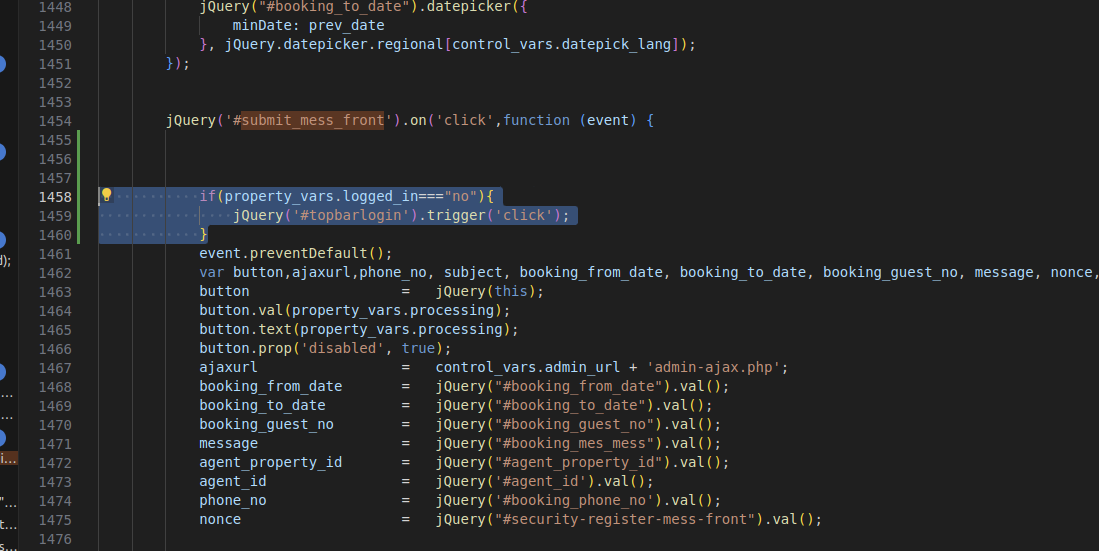
To force login for the Contact form in the listing page, when it is rep[lacing the Booking form, you need to go to js/property.js  and around line 1458 and add the below code


if(property_vars.logged_in==="no"){
jQuery('#topbarlogin').trigger('click');
}
Technical how to

Related Articles

  • How to Make a Contact Button Open WhatsApp
  • How to add a new currency in Theme Options for payments.
  • How to Disable WordPress Image Compression and Preserve Original Quality
  • How to Change the Default Categories Icon from Listing Card Unit

HELP CATEGORIES

  • 61. General
  • 72. Installation & Basic Setup
  • 373. How Booking Works
  • 18Advanced Search
  • 17Elementor WPRentals Studio
  • 14Email Notifications
  • 23FAQ
  • 14Installation FAQ
  • 10Menu Options
  • 33Owner & Renter
  • 8Page Templates
  • 24Property / Listing
  • 22Shortcodes
  • 4Supported Maps
  • 99Technical how to
  • 5Third Party plugins
  • 4Translation & Multi Languages
  • 3WordPress Blog Post
  • 13WordPress Widgets
  • 12WP Rentals Payments
  • 80WP Rentals Theme Options
  • 26WPML & Weglot

Join Us On

Powered by WP Estate - All Rights Reserved
  • Client Support
  • Video Tutorials
  • WPRentals
  • WPEstate
  • API