
TThe setting is called Maximum Month Number (per booking). It controls how many months are displayed/generated in the theme calendar views used for availability, listing calendar management, and the All-In-One Calendar.
Where to Change the Number of Calendar Months
To change the number of months displayed in the calendar, go to:
Theme Options > Booking Configuration > Calendar Settings
Find the option:
Maximum Month Number (per booking)
Depending on your WPRentals version, this setting may also appear under:
Theme Options > Booking Settings > Maximum Month Number (per booking)
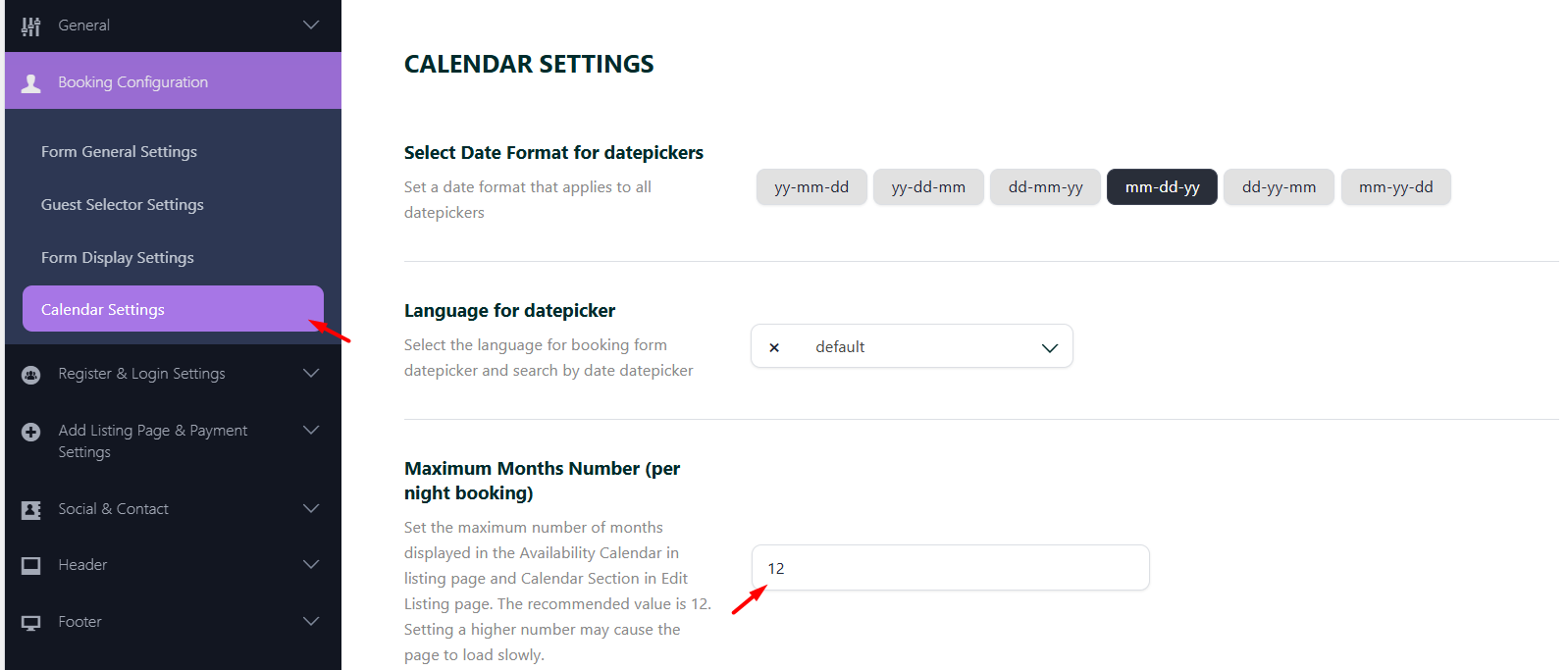
After changing the value, save Theme Options and check the calendar areas on the front end.
What This Setting Does
The Maximum Month Number (per booking) option controls how many months are displayed/generated in the WPRentals calendar views.
For example, if the value is set to 12, the calendar areas can show up to 12 months.
This is useful if owners or site admins need to manage availability, manual booked periods, or custom prices for a longer period ahead.
Where This Setting Applies
The setting applies to the WPRentals calendar areas, including:
- Availability Calendar on the single listing page
- Edit Listing Calendar in the front-end User Dashboard
- All-In-One Calendar in the front-end User Dashboard
Availability Calendar on the Listing Page
The Availability Calendar on the single listing page shows visitors which dates are available or unavailable for that listing.
The number of months shown in this calendar is affected by the Maximum Month Number (per booking) setting.

Edit Listing Calendar in the User Dashboard
The Edit Listing Calendar is managed from the front-end dashboard.
Owners and site admins use this area to manage availability for one listing.
Go to:
User Dashboard > My Listings > Edit Listing > Calendar
From this section, the user managing the listing can:
- block dates manually
- add or review unavailable dates
- manage custom price periods
- manage iCal import/export feeds

All-In-One Calendar in the User Dashboard
The All-In-One Calendar is also part of the front-end User Dashboard.
It shows the listings connected to the logged-in owner or site admin and their booked/unavailable dates.
Go to:
User Dashboard > All-In-One Calendar
This calendar is useful when the owner or site admin manages several listings and wants to review or block availability from one screen.

Performance and Database Note
The number of months displayed in the calendar should be set based on what your website actually needs.
A higher number of months can increase the amount of data saved for each listing, especially when owners or site admins use:
- custom prices for many future periods
- availability changes across many months
- manual booked periods across many months
- many listings on the website
Important Notes
- The setting is called Maximum Month Number (per booking).
- It is managed from Theme Options > Booking Configuration > Calendar Settings.
- Depending on your WPRentals version, the setting may appear under Theme Options > Booking Settings.
- This setting controls how many months are displayed/generated in WPRentals calendar views.
- It applies to the listing Availability Calendar, Edit Listing Calendar, and All-In-One Calendar.
- It does not automatically block future dates.
- To block dates, use manual booked periods, confirmed bookings, iCal feeds, or listing booking restrictions.
- Owners and site admins manage listing calendars from the front-end User Dashboard.
- The All-In-One Calendar is not recommended for mobile devices or screen resolutions lower than 1200px.
- Increasing the number of months can increase saved calendar/custom price data per listing.
Related Help
Theme Options – Booking Configuration
How to adjust the number of months shown in the booking calendar
How to make calendar and booking unavailable
How to manually block dates and manage external bookings
Seasonal prices and custom prices for calendar days
Summary
- Use Maximum Month Number (per booking) to control how many months are displayed in WPRentals calendar areas.
- The setting affects the listing availability calendar, the Edit Listing Calendar, and the All-In-One Calendar.
- Changing this value does not block dates by itself.
- Dates are blocked through confirmed bookings, manual booked periods, iCal feeds, or listing restrictions.
- Use this setting carefully because more months can increase saved calendar data per listing.
- The All-In-One Calendar should be used on desktop or laptop screens, not mobile devices.