
WP Rentals Help WP Rentals Help

  • Client Support
  • Video Tutorials
  • WpRentals
  • WpEstate
  • API
Home / Page Templates / GDPR terms page

GDPR terms page

6512 views

To create the page, go to Admin > Pages > Add New, and assign the GDPR Terms template.

Enable GDPR in the contact form

  • Go to Theme Options > Contact Form Settings.
  • Enable Use GDPR Checkbox? in the Owner Contact form.
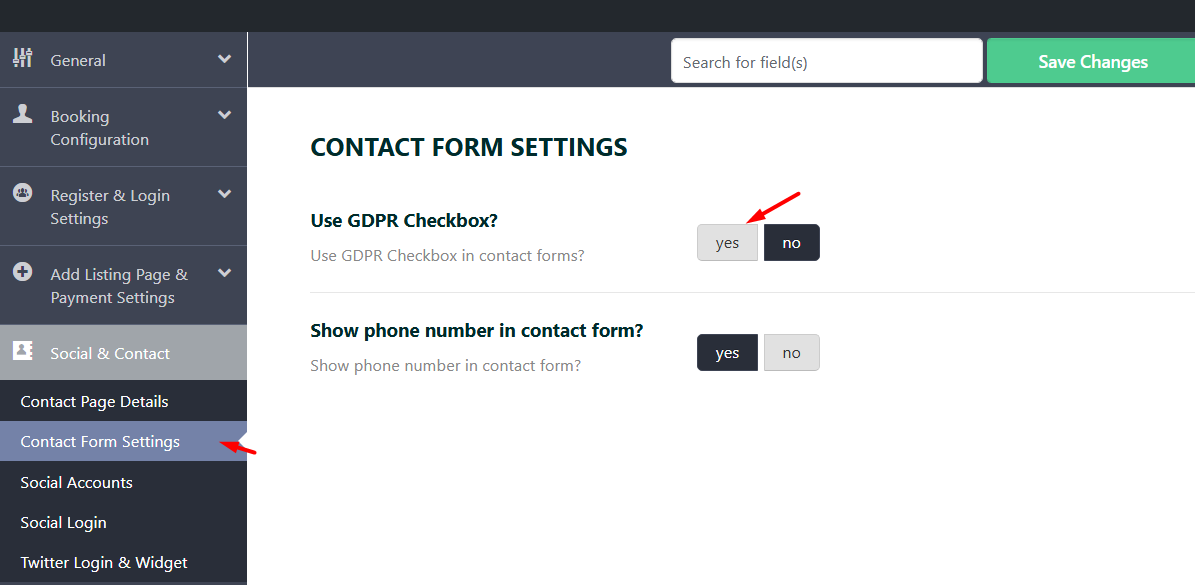
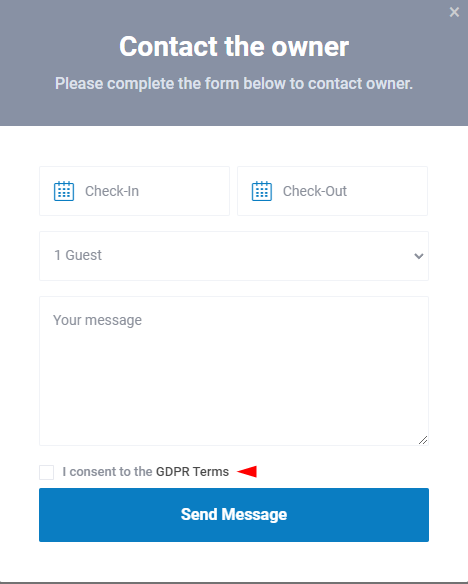
If enabled, the checkbox with GDPR terms will show in contact forms.
Page Templates

Related Articles

  • How to Create Property Lists in WP Rentals
  • Theme Options – Contact Page Details
  • TERMS AND CONDITIONS
  • Properties List Half – Custom Page Template

HELP CATEGORIES

  • 71. General
  • 102. Installation & Basic Setup
  • 393. How Booking Works
  • 20Advanced Search
  • 19Elementor Free & WP Rentals Studio
  • 13Email Notifications
  • 10FAQ
  • 14Installation FAQ
  • 10Menu Options
  • 27Multi-Languages - 3rd party
  • 32Owner & Renter
  • 9Page Templates
  • 24Property / Listing
  • 22Shortcodes
  • 4Supported Maps
  • 97Technical how to
  • 5Third Party plugins
  • 3Translation
  • 3WordPress Blog Post
  • 13WordPress Widgets
  • 12WP Rentals Payments
  • 78WP Rentals Theme Options

Join Us On

Powered by WP Estate - All Rights Reserved
  • Client Support
  • Video Tutorials
  • WpRentals
  • WpEstate
  • API