
WPRentals Theme Documentation WPRentals Theme Documentation

  • Client Support
  • Video Tutorials
  • WPRentals
  • WPEstate
  • API
Home / FAQ / How do I remove the page title or Breadcrumbs from the top of a page?

How do I remove the page title or Breadcrumbs from the top of a page?

3 views

If the page name or draft title appears at the top of the page, or in a link at top of the page (breadcrumbs), you can remove the default theme title area by changing the page template.

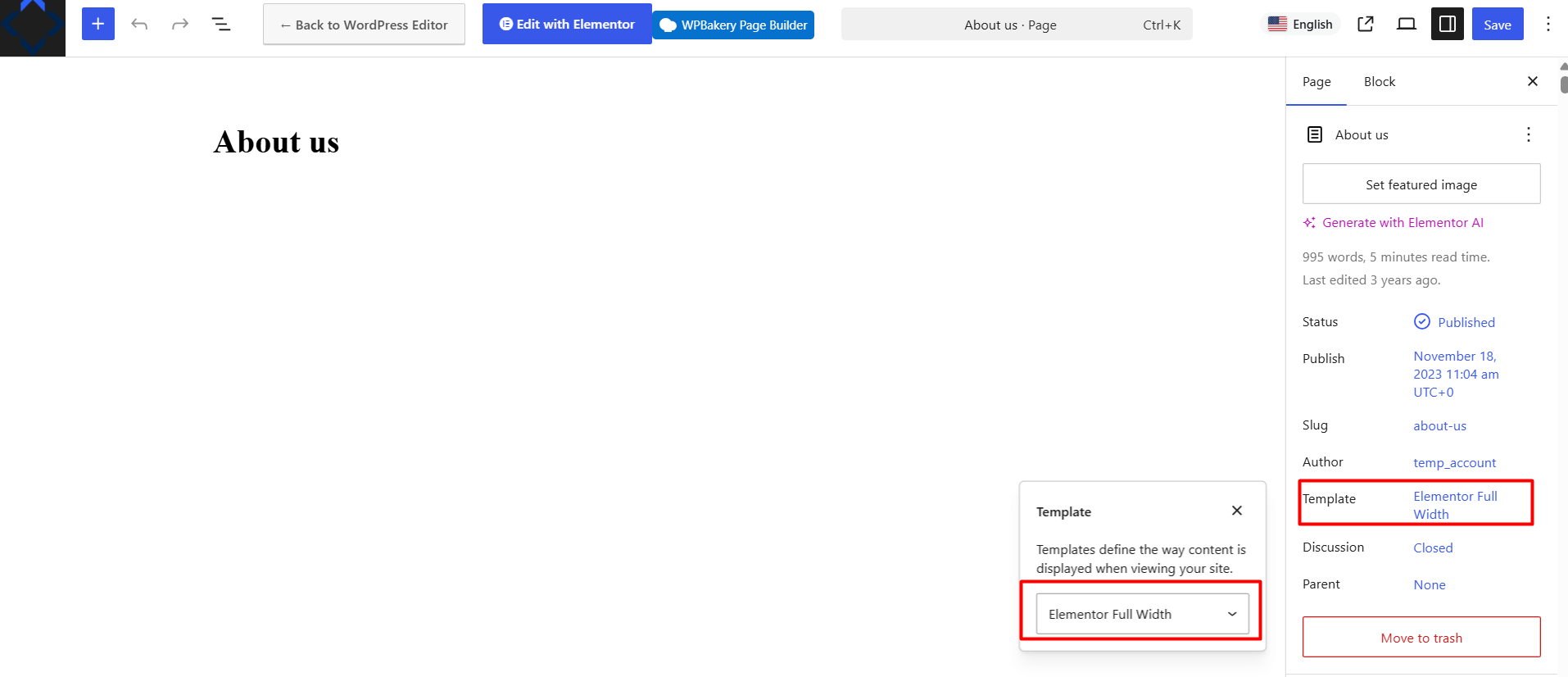
Edit the page in WordPress and look for the Template option in the page settings.

Select this template:

Editor Full Width

Then update the page and check it again on the front end.

The Editor Full Width template removes the default theme title area and lets you control the page content directly from the editor or Elementor.
FAQ

Related Articles

  • FAQ: General Site behavior is slow
  • FAQ: Can I Edit the Dates of a Pending Booking?
  • Why is the account avatar or user dropdown menu not working in my custom header?
  • Can You Change the Select Box Style in WpRentals

HELP CATEGORIES

  • 71. General
  • 102. Installation & Basic Setup
  • 393. How Booking Works
  • 20Advanced Search
  • 18Elementor Free & WP Rentals Studio
  • 14Email Notifications
  • 24FAQ
  • 15Installation FAQ
  • 10Menu Options
  • 27Multi-Languages - 3rd party
  • 34Owner & Renter
  • 9Page Templates
  • 23Property / Listing
  • 22Shortcodes
  • 4Supported Maps
  • 98Technical how to
  • 5Third Party plugins
  • 3Translation
  • 3WordPress Blog Post
  • 13WordPress Widgets
  • 13WP Rentals Payments
  • 80WP Rentals Theme Options

Join Us On

Powered by WP Estate - All Rights Reserved
  • Client Support
  • Video Tutorials
  • WPRentals
  • WPEstate
  • API