
WPRentals Theme Documentation WPRentals Theme Documentation

  • Client Support
  • Video Tutorials
  • WPRentals
  • WPEstate
  • API
Home / WP Rentals Theme Options / Theme options – Yelp Integration

Theme options – Yelp Integration

7299 views

You can integrate Yelp to display nearby places and their Yelp ratings on the property page — enhancing the user experience with local recommendations.
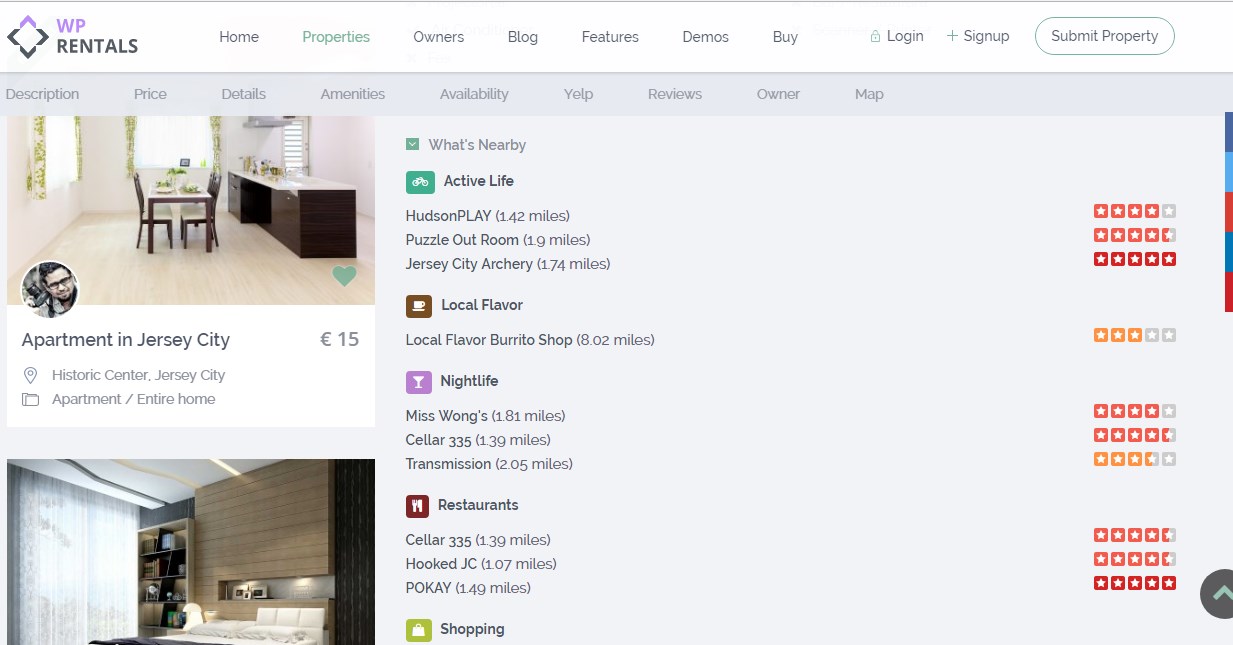
How It Works:

Check Availability
First, verify if Yelp is available in your country.
👉 View supported countries

Enable Yelp Integration
If Yelp is supported in your country and you wish to show nearby locations on the property page, follow the steps below.
(If you leave the fields blank, the Yelp section will not be shown.)

Access Theme Settings
Go to Admin Dashboard → Theme Options → Listing Page→ Yelp Settings

Create a Yelp App

  • Sign up or log in at Yelp Developers
  • Create a new app to generate your Client ID and Client Secret

Add API Credentials

  • Copy the Client ID and Client Secret from Yelp
  • Paste them into the respective fields in Theme Options → Yelp Settings

Customize Display Options

  • Choose which Yelp categories to show
  • Set how many results to display per category
  • Select distance units: miles or kilometers
WP Rentals Theme Options

Related Articles

  • What Is the WPESTATE FAN Option
  • White-Label WPRentals with Your Brand
  • How SMS Notifications Work in WP Rentals (WpestateEmail Class): A Complete Guide
  • Orphan Listings and Auto Delete Option in WPRentals

HELP CATEGORIES

  • 61. General
  • 72. Installation & Basic Setup
  • 373. How Booking Works
  • 18Advanced Search
  • 17Elementor WPRentals Studio
  • 14Email Notifications
  • 23FAQ
  • 14Installation FAQ
  • 10Menu Options
  • 34Owner & Renter
  • 8Page Templates
  • 23Property / Listing
  • 22Shortcodes
  • 4Supported Maps
  • 99Technical how to
  • 5Third Party plugins
  • 4Translation & Multi Languages
  • 3WordPress Blog Post
  • 13WordPress Widgets
  • 12WP Rentals Payments
  • 80WP Rentals Theme Options
  • 26WPML & Weglot

Join Us On

Powered by WP Estate - All Rights Reserved
  • Client Support
  • Video Tutorials
  • WPRentals
  • WPEstate
  • API