
Overview
This help explains why website emails can go to the junk or spam folder and what must be checked to improve email delivery.
This applies to websites using WPResidence or WPRentals, because the theme can trigger WordPress emails, but the final delivery depends on the mail server, DNS authentication records, sender reputation, and the receiving email provider.
Does the Theme Control Email Delivery?
No. The theme does not control inbox placement.
The theme can trigger the WordPress email function when an action happens on the website, for example a contact form message, booking notification, registration email, password reset email, or admin notification.
After the email is triggered, the delivery process depends on the server and the mail service used to send the message.
How WordPress Sends Emails
WordPress uses its email sending function to process outgoing messages. By default, many WordPress websites send emails through the hosting server, usually through the server mail configuration or PHP mail.
This setup can work, but it is often less reliable than using an authenticated SMTP service.
A successful WordPress email process only means the email was handed to the sending method. It does not guarantee that the recipient mail provider accepted it into the inbox.
Common Reasons Emails Go to Junk
The most common reasons are:
- Missing or incorrect SPF record.
- Missing or incorrect DKIM record.
- Missing or incorrect DMARC record.
- The website sends emails from an address that does not match the website domain.
- The sender address is not authorized by the mail server.
- The sending server IP has poor reputation.
- The sending server IP is blacklisted.
- Missing or incorrect reverse DNS / PTR record.
- The website uses default PHP mail instead of authenticated SMTP.
- The email content looks suspicious to the receiving mail provider.
- A cache, security, or SMTP plugin is misconfigured.
Use a Valid Sender Email Address
It is recommended to use an email address that belongs to your own domain.
Example:
This is better than using a sender address from another domain, such as a Gmail, Yahoo, Outlook, or random default server address.
The sender email should be accepted by your hosting provider or mail provider. For example, if your website domain is yourdomain.com, use a sender such as:
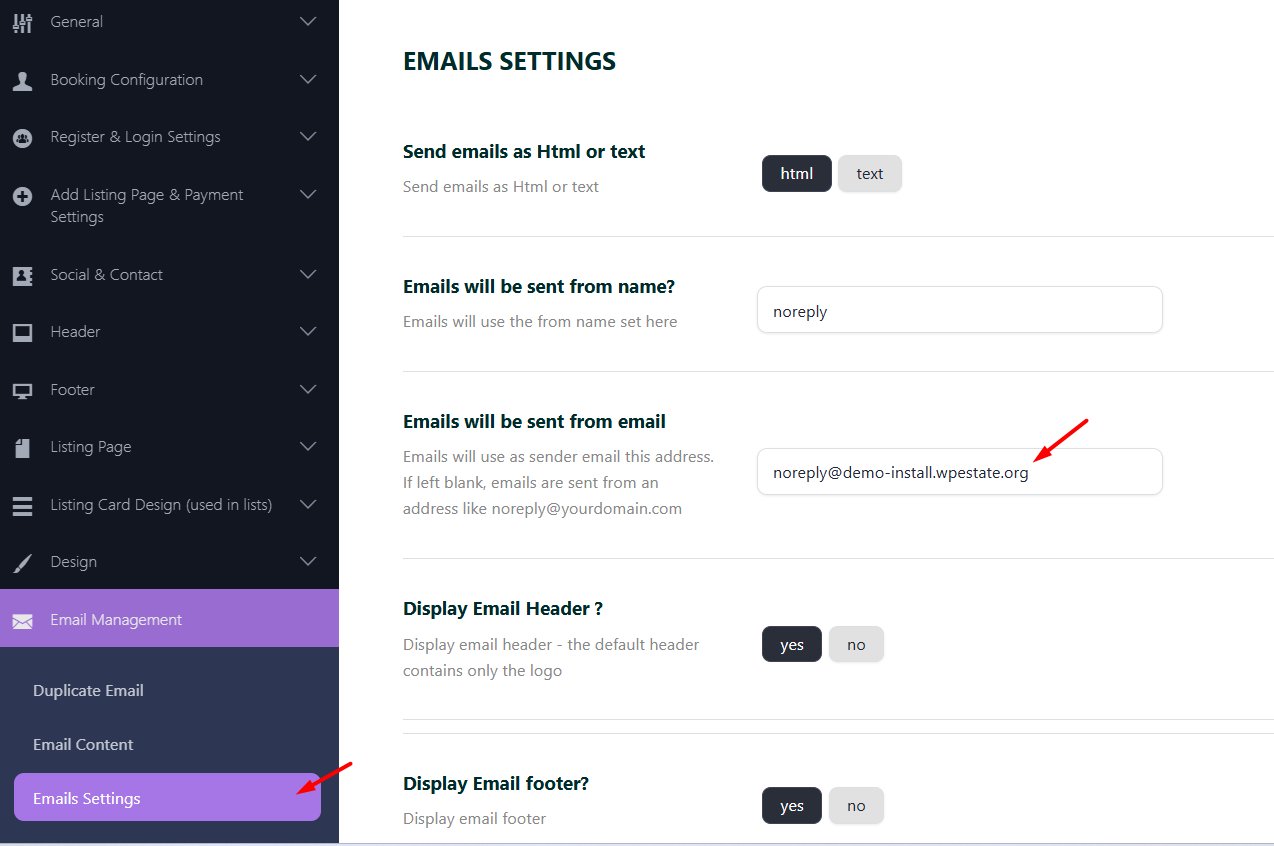
Add the valid sender email in the theme email settings, if the option is available in your theme setup.
Check SPF, DKIM, and DMARC
Email authentication helps receiving mail providers verify that your domain is allowed to send the message.
SPF
SPF tells receiving mail servers which servers are allowed to send email for your domain.
DKIM
DKIM adds a digital signature to outgoing emails. This helps prove the message was authorized by your domain or mail provider.
DMARC
DMARC works with SPF and DKIM. It tells receiving mail servers how to handle messages that fail authentication checks.
Ask your hosting provider, domain DNS provider, or email provider to confirm that all three records are correctly configured for the domain used as sender.
Use Authenticated SMTP
In most cases, authenticated SMTP is more reliable than the default PHP mail function.
SMTP sends emails through a real mail account or email service and uses authentication. This helps receiving mail providers verify the sender better.
Common SMTP options include:
- Your hosting provider SMTP service.
- Your business email provider SMTP service.
- A dedicated transactional email service.
- A WordPress SMTP plugin configured with a valid email account.
Check Server Reputation and DNS
Even if the theme sends the email correctly, messages can still go to spam if the sending server has reputation issues.
Ask your hosting provider or mail administrator to check:
- If the sending IP is blacklisted.
- If the sending IP has poor sender reputation.
- If reverse DNS / PTR is configured correctly.
- If the server hostname is valid.
- If the mail server signs emails correctly with DKIM.
- If the sender address matches the authenticated sending domain.
How to Test Email Delivery
To test the issue correctly:
- Send a test email from the website.
- Check if the email arrives in inbox, spam, junk, promotions, or not at all.
- Test with different recipient providers, such as Gmail, Outlook, Yahoo, or your business email.
- Check the email headers of the received message.
- Look for SPF, DKIM, and DMARC pass or fail results in the email headers.
- Check the mail logs on the sending server.
- If SMTP is used, send a test email from the SMTP plugin or SMTP service.
What Can Be Checked From the Theme Side?
From the theme side, you can check only the theme email-related settings.
Check the following:
- The sender email address is valid.
- The admin or recipient email address is correct.
- The email notification option is enabled, if the theme has an option for that email.
- The email template does not contain broken shortcodes, missing content, or invalid links.
- The email is triggered by the expected website action.
If the email is triggered and sent, but it goes to junk, the next step is to check the mail server and authentication setup.
What Should Hosting or Mail Support Check?
If emails still go to junk after the sender email and theme settings are checked, your hosting provider, mail provider, or system administrator should review the sending setup.
They should check:
- Mail server logs.
- SPF record.
- DKIM record and signature.
- DMARC record and alignment.
- Reverse DNS / PTR record.
- Sender domain and server hostname.
- Sending IP reputation and blacklist status.
- SMTP authentication.
- Any delivery warnings returned by Gmail, Outlook, Yahoo, or other receiving providers.
Important Notes
- The theme can trigger website emails, but it cannot control inbox placement.
- WordPress email sending does not guarantee inbox delivery.
- Emails going to junk are usually related to DNS, server reputation, sender authentication, or SMTP configuration.
- Use a sender email that belongs to your domain.
- Check SPF, DKIM, and DMARC records for the sending domain.
- Use authenticated SMTP when possible.
- Check the sending server IP reputation and reverse DNS / PTR record.
- If emails are sent but go to junk, your hosting provider or mail administrator must check the mail logs and server configuration.
- If emails are not sent at all, check theme notification settings, WordPress email sending, SMTP plugin settings, and server mail logs.