
Why the “User Registration Is Currently Disabled” Message Appears
The message “User registration is currently disabled” appears when registration is disabled in the main WordPress settings.
Even if the theme login and register modal is enabled, WordPress must also allow user registration. If that WordPress setting is turned off, new users will not be able to register and the modal will show this message instead.
Where to Enable User Registration in WordPress
To enable user registration, go to:
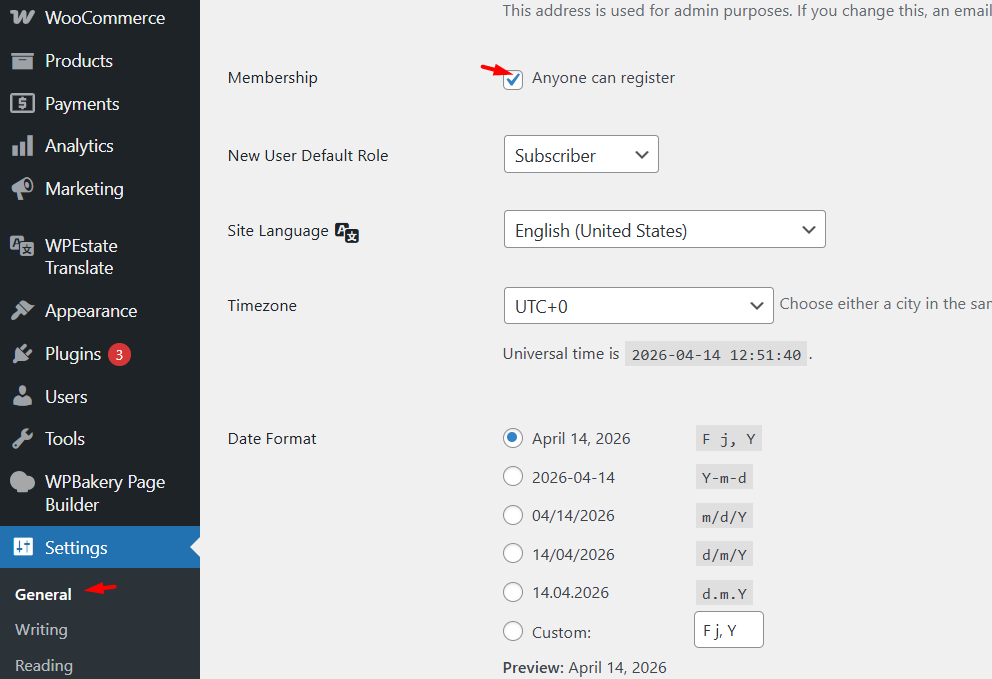
WordPress Admin > Settings > General
Then find the Membership option and check:
Anyone can register
Save the changes after enabling the setting.
This option must be enabled for the register modal to allow new account creation.
How This Affects the Register Modal
The WpResidence or WpRentals register modal depends on the WordPress registration setting.
If Anyone can register is disabled in WordPress, the register form cannot work, even if the theme shows login and registration options in the header or modal.
Once registration is enabled from the WordPress settings, the register modal can work normally again.
Important Note About the Support Platform
Please note that support has moved to the new platform:
For any follow-up questions, please create an account on the new support system and submit your ticket there.
Support hours are Monday to Friday, 8:00 AM to 4:00 PM, Europe time.