
Starting 3.16 theme version.
WpRentals now lets you import Elementor page templates or WpRentals Studio templates into your Elementor layouts. You can import a template from our existing demos, regardless of the current demo imported.
If you create a page with Elementor, you cannot edit it with Gutenberg or Bakery
If you create a page with Bakery, you cannot edit it with Elementor.
Elementor and WpRentals Elementor Widgets plugins are required.
Install the theme – help https://help.wprentals.org/article/theme-installation/
Start creating pages with Elementor
Go to Page > Add New > Open the page with Elementor > Start Building
Use the WpRentals Templates option in Elementor
You can now import ready-made WpRentals templates directly from Elementor.
Go to Pages > Add New > Edit with Elementor and click the WPRentals Templates tab icon in the editor area.

In the template library popup, choose the design you want, and click Insert.
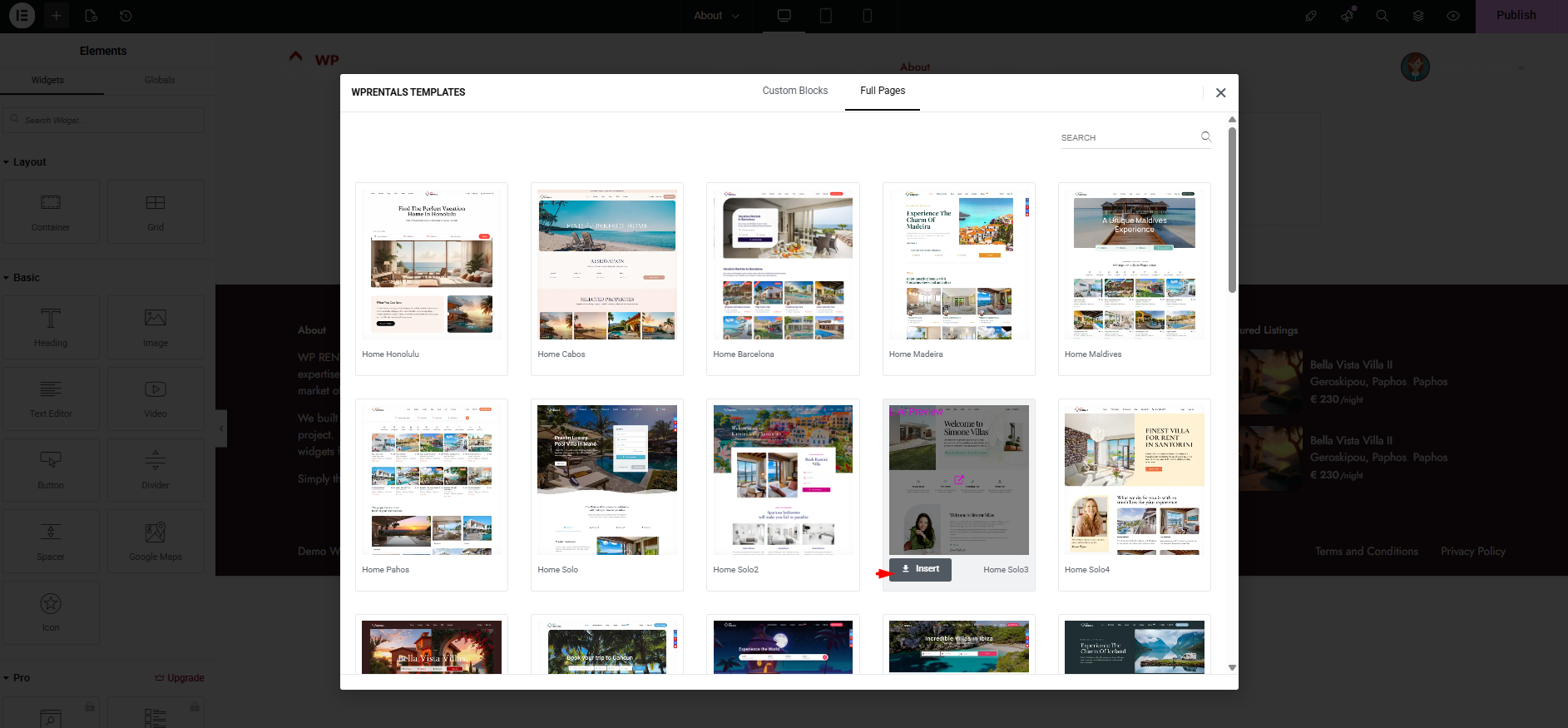
After inserting, customize the content with Elementor and click Publish/Update.
Elementor Documentation
Error 500 on save https://elementor.com/help/publish-update-button-not-work/
Server requirements https://elementor.com/help/requirements/
The theme needs PHP 7.4 or greater.
Wp Rentals Elementor addon is optional and you can disable it if you don’t want to use the Elementor plugin.
The Elementor plugin itself needs PHP 8.0.
Before 3.16 theme version
WpRentals Elementor Widgets – is optional and you should install it if you want to work with Elementor Page Builder. This plugin has all theme Rentals shortcodes as Elementor Widgets.
How to create Pages in WpRentals Theme
The theme offers support for 3 different editors for you to create and manage pages content:
- 1. WordPress classic editor + Bakery Plugin (theme shortcodes will show in Bakery Plugin list of shortcodes) OR
- 2. WordPress Gutenberg Editor + WP Rentals Gutenberg (theme shortcodes will appear in Gutenberg blocks list) OR
- 3. WordPress classic + ELEMENTOR (free plugin) + WpRentals Elementor Add-ons (theme shortcodes will appear in Elementor Page builder)
If you create a page with Elementor, you cannot edit it with Gutenberg or Bakery editor.
If you create a page with Bakery, you cannot edit it with Elementor.
Install Elementor
Elementor is a free Page Builder plugin which you install from here https://elementor.com/ or from WordPress Repository – https://wordpress.org/plugins/elementor/.
Elementor PRO is a PAID extension which is optional (this add-on works with WpRentals Elementor Widgets as well)
Go to Admin > Plugins > Add New
Type as Keyword “Elementor” and install “Elementor Page Builder”
Activate
Install WpRentals Elementor Widgets plugin
Install the theme – help https://help.wprentals.org/article/theme-installation/
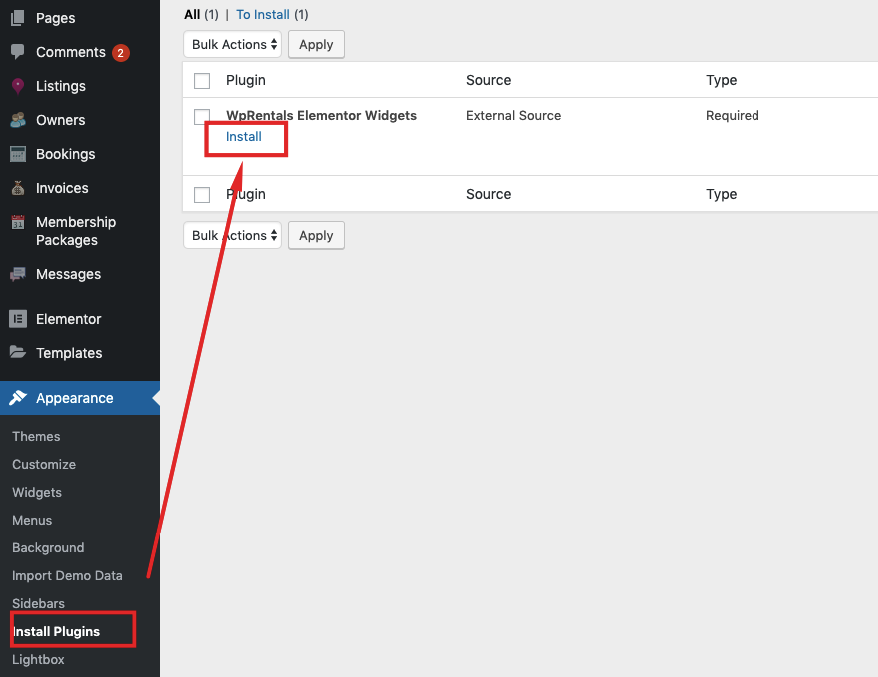
Go to Admin -> Install Plugins -> WpRentals Elementor Addon -> Install
Start creating pages with Elementor
Go to Page > Add New > Open the page with Elementor > Start Building
WpRentals Elementor Widgets will be listed under Elementor

Elementor Documentation
Error 500 on save https://elementor.com/help/publish-update-button-not-work/
Server requirements https://elementor.com/help/requirements/
The theme needs PHP 7.4 or greater.
Wp Rentals Elementor addon is optional and you can disable it if you don’t want to use the Elementor plugin.
The Elementor plugin itself needs PHP 8.0.