
In WPRentals, there are two different deposit-related options:
- Security Deposit Fee – set per listing by the property owner.
- Booking Deposit Fee – set globally by the site admin in Theme Options.
These two options are different and should not be confused.
The Security Deposit Fee is not a separate automatic card hold or automatic refund system. It is added to the booking total and collected through the normal booking payment flow. Any refund of the Security Deposit must be handled manually by the admin outside the theme.
Security Deposit Fee
The Security Deposit Fee is set for each individual listing.
It is added by the property owner from:
My Properties > Edit or Add Property > Price > Security Deposit
This fee represents the security deposit requested for that specific property.
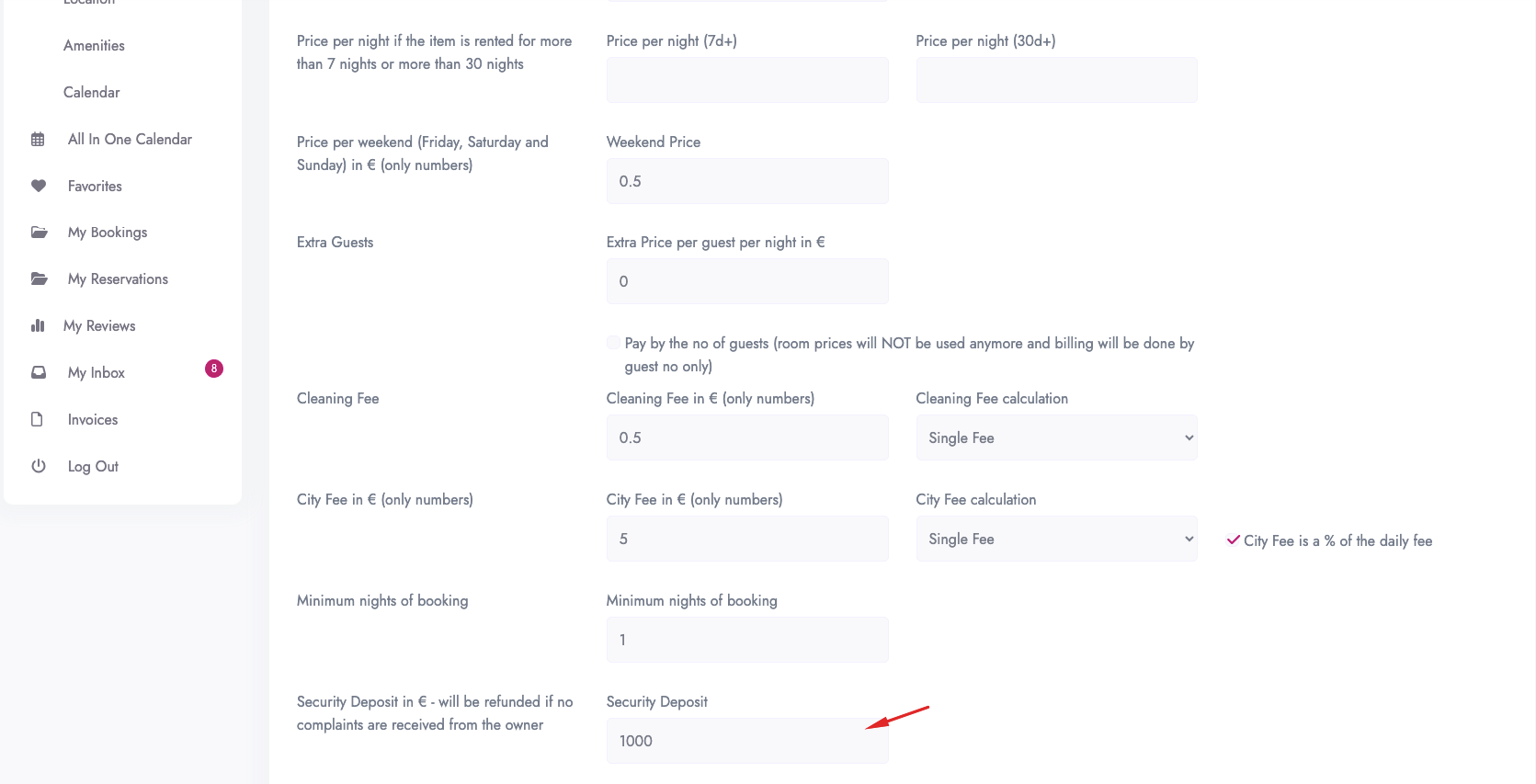
When a booking request is made, the Security Deposit Fee is added to the booking total.

Booking Deposit Fee
The Booking Deposit Fee is set globally by the site admin.
It is managed from:
Theme Options > Add Listing Page & Payment Settings > Booking Payment Settings
This is the amount the renter must pay to confirm the booking.
The Booking Deposit Fee can be:
- a percentage of the booking total
- a fixed amount

This setting applies globally to all listings and is independent from the Security Deposit Fee.
Key Differences
- Security Deposit Fee is set per listing by the property owner.
- Booking Deposit Fee is set globally by the site admin.
- Security Deposit Fee is added to the booking total.
- Booking Deposit Fee controls how much the renter must pay to confirm the booking.
- The Security Deposit is not refunded automatically by the theme.
How the Security Deposit Is Refunded
The Security Deposit Fee is included in the booking amount collected through the website.
The collected amount goes to the Admin Account as part of the booking payment flow.
The refund of the Security Deposit is manual.
After the booking is completed, the admin must manually return the security deposit to the renter outside the theme.
WPRentals does not automatically refund the Security Deposit Fee. The refund must be handled manually by the site admin.
Scenario 1: Booking Deposit Fee Is 100%
If the Booking Deposit Fee is set to 100%, the renter pays the full booking amount when the booking is confirmed.
This includes:
- booking price
- security deposit
- other included fees, depending on your payment settings
All funds collected through the website go to the Admin Account.

Scenario 2: Booking Deposit Fee Is Less Than 100%
If the Booking Deposit Fee is set to less than 100%, the renter pays only part of the booking total when confirming the booking.
Because the deposit is calculated from the full booking total, the first payment may include only part of the Security Deposit Fee.
To collect the full security deposit amount through the website, the renter must also pay the remaining balance.
The system can send a payment reminder, and the owner can send up to three manual reminders.
If the remaining balance is not paid through the website, the booking can still continue unless the owner cancels it manually.
Remove Security Deposit From the Submit Listing Form
If you do not want owners to add a Security Deposit Fee, you can remove this field from the submit listing form.
Option 1: Remove the Field From Theme Options
You can manage the submit form fields from Theme Options.
Help article about how to manage submit form fields and mandatory fields

Option 2: Hide the Field With Custom CSS
To hide the security deposit field with CSS, you can use:
[for="security_deposit"] {
display: none;
}

[id="security_deposit"] {
display: none;
}
Summary
- Security Deposit Fee is set per listing.
- Booking Deposit Fee is set globally in Theme Options.
- The Security Deposit is added to the booking total.
- The Booking Deposit Fee decides how much must be paid to confirm the booking.
- If the Booking Deposit Fee is 100%, the full amount is collected upfront.
- If the Booking Deposit Fee is less than 100%, only part of the total is collected first.
- Security Deposit refunds are handled manually outside the theme.
- WPRentals does not manage automatic Security Deposit refunds.