
WPRentals Theme Documentation WPRentals Theme Documentation

  • Client Support
  • Video Tutorials
  • WPRentals
  • WPEstate
  • API
Home / Technical how to / Technical: How to save Area independent from City

Technical: How to save Area independent from City

6259 views

When a listing is saved from the front-end submission form, WPRentals can handle the Area in two ways. It can save the Area exactly as it was selected, or it can create a separate “Area, City” area when the selected Area belongs to a different City. This article shows how to choose between them.

WPRentals 3.19.0 and newer

No code change is needed. Go to WPRentals Theme Options > Add Listing Page & Payment Settings > Listing Submission Form and find the option Save Area independent from City?
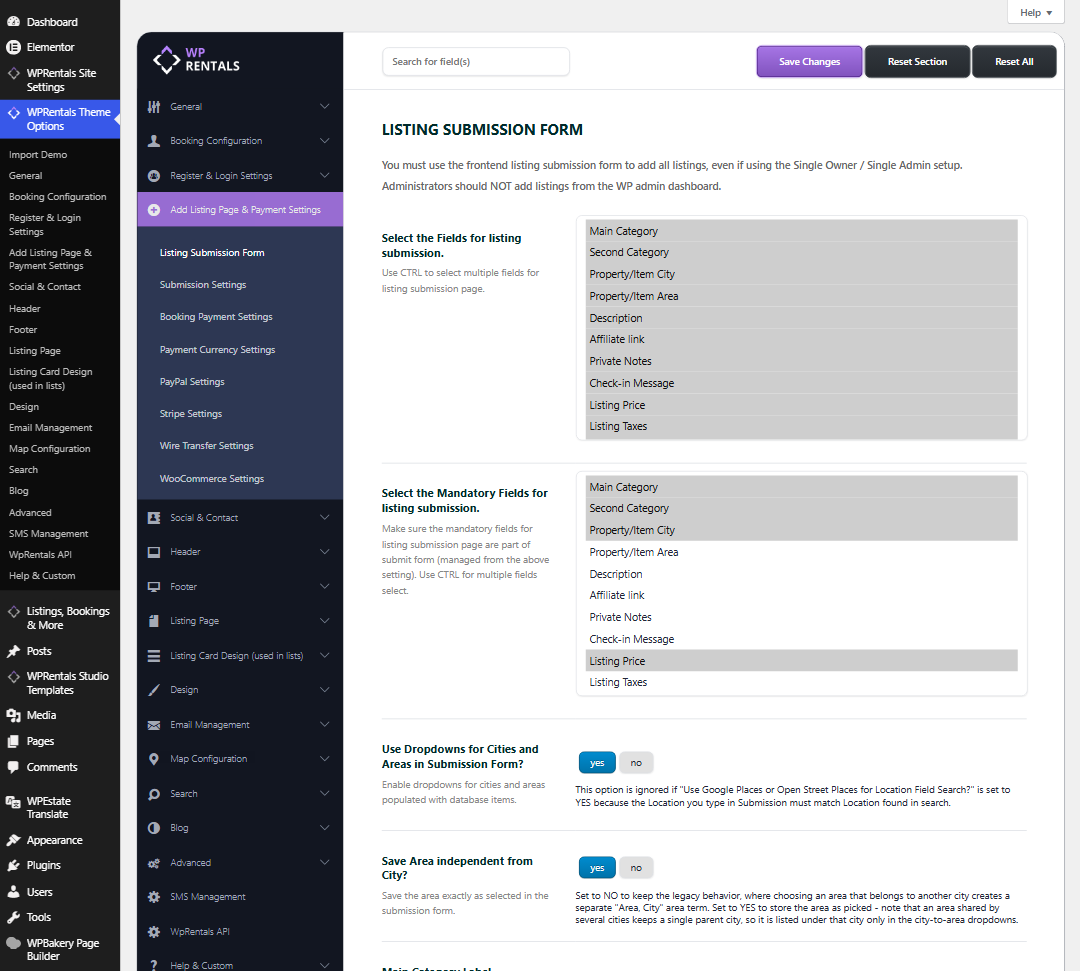

WPRentals Theme Options, Add Listing Page and Payment Settings, Listing Submission Form section with the Save Area independent from City option

The Save Area independent from City option set to yes

  • yes (default) – the Area is saved exactly as it was selected in the submission form.
  • no – the older behavior. If the selected Area belongs to another City, a separate “Area, City” area is created for the listing.

Please note: an Area used by several Cities keeps only one parent City. In the city-to-area dropdowns it is listed under that City only.

Click Save Changes after you change the option.

Older WPRentals versions (before 3.19.0)

The option above is not available in older versions. The best way to get it is to update the theme and its plugins: How to update WPRentals theme and included plugins.

If you cannot update yet, open wprentals/functions.php, find the function wpestate_double_tax_cover and add these two lines at the start of the function:

wp_set_object_terms($post_id,$property_area,'property_area');
return $property_area;
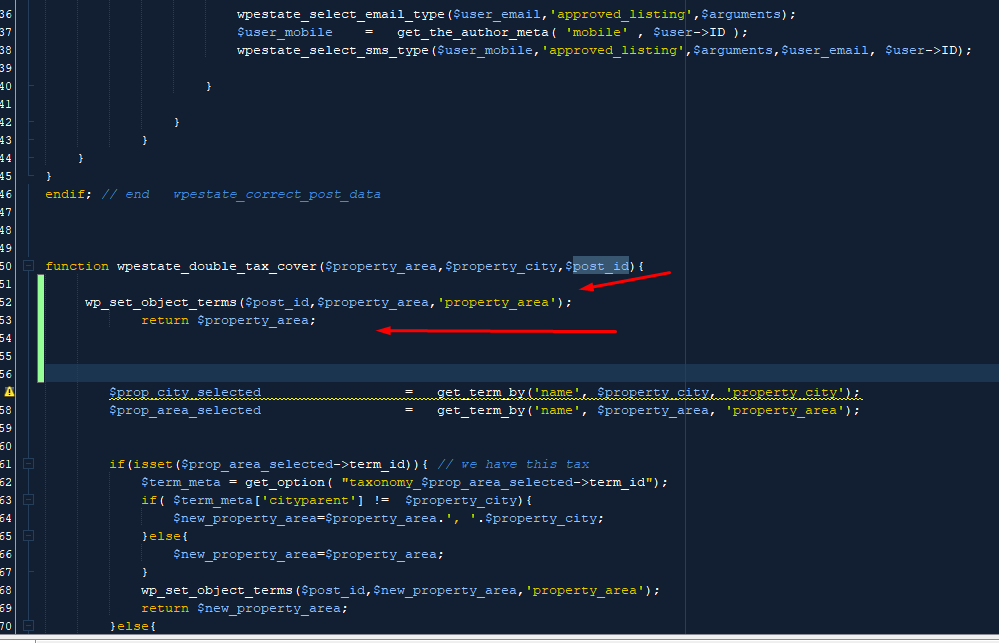
The two lines added at the start of the wpestate_double_tax_cover function in functions.php

This change is lost when the theme is updated, because the update replaces functions.php. After you update to 3.19.0 or newer, use the Save Area independent from City? option instead.

Technical how to

Related Articles

  • How to Make the Check-Out Field Read Only in the Search and Booking Forms
  • How to Make a Contact Button Open WhatsApp
  • How to add a new currency in Theme Options for payments.
  • How to Disable WordPress Image Compression and Preserve Original Quality

HELP CATEGORIES

  • 71. General
  • 72. Installation & Basic Setup
  • 383. How Booking Works
  • 18Advanced Search
  • 17Elementor WPRentals Studio
  • 14Email Notifications
  • 28FAQ
  • 14Installation FAQ
  • 10Menu Options
  • 33Owner & Renter
  • 8Page Templates
  • 25Property / Listing
  • 22Shortcodes
  • 4Supported Maps
  • 100Technical how to
  • 5Third Party plugins
  • 4Translation & Multi Languages
  • 3WordPress Blog Post
  • 13WordPress Widgets
  • 12WP Rentals Payments
  • 83WP Rentals Theme Options
  • 26WPML & Weglot

Join Us On

Powered by WP Estate - All Rights Reserved
  • Client Support
  • Video Tutorials
  • WPRentals
  • WPEstate
  • API