
WPRentals Theme Documentation WPRentals Theme Documentation

  • Client Support
  • Video Tutorials
  • WPRentals
  • WPEstate
  • API
Home / Technical how to / Technical: How to show owner social details for all users

Technical: How to show owner social details for all users

6774 views

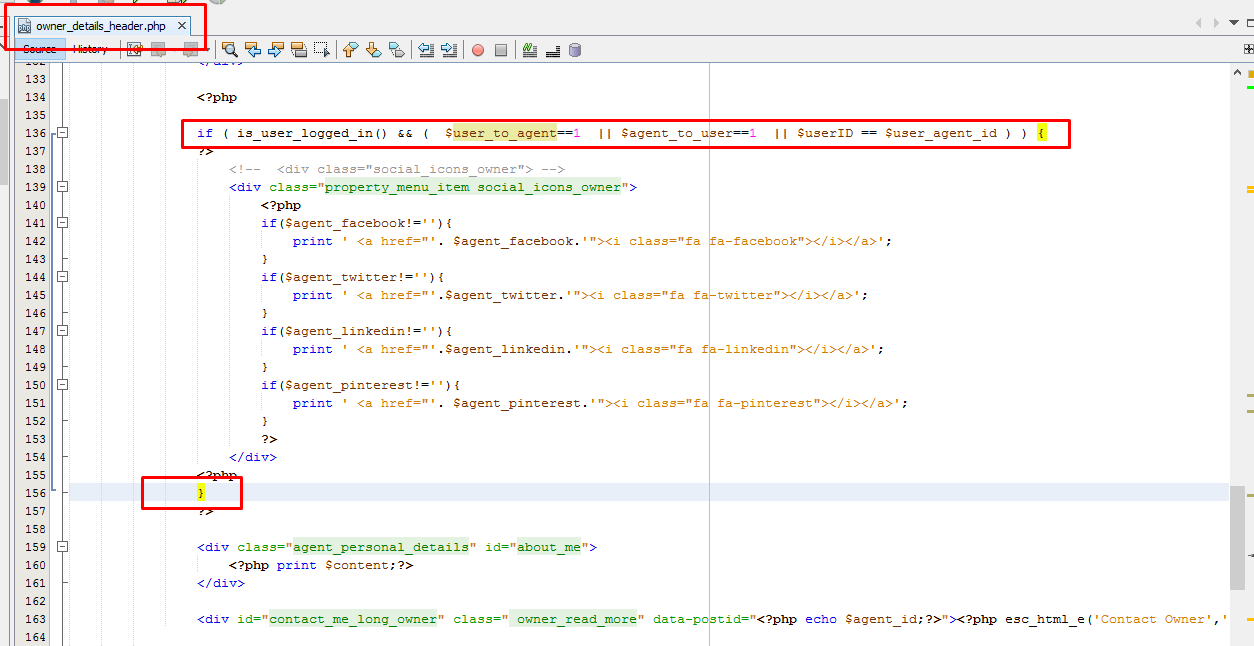
Owner social details can be seen only by logged users that have a confirmed booking for one of owner’s properties.

To show social details to all users (registered or not) remove the highlighted code  from wprentals/templates/owner_details_header.php file
 

Technical how to

Related Articles

  • How to Make a Contact Button Open WhatsApp
  • How to add a new currency in Theme Options for payments.
  • How to Disable WordPress Image Compression and Preserve Original Quality
  • How to Change the Default Categories Icon from Listing Card Unit

HELP CATEGORIES

  • 61. General
  • 72. Installation & Basic Setup
  • 363. How Booking Works
  • 20Advanced Search
  • 17Elementor WPRentals Studio
  • 14Email Notifications
  • 23FAQ
  • 14Installation FAQ
  • 10Menu Options
  • 34Owner & Renter
  • 9Page Templates
  • 23Property / Listing
  • 22Shortcodes
  • 4Supported Maps
  • 99Technical how to
  • 5Third Party plugins
  • 4Translation & Multi Languages
  • 3WordPress Blog Post
  • 13WordPress Widgets
  • 12WP Rentals Payments
  • 79WP Rentals Theme Options
  • 26WPML & Weglot

Join Us On

Powered by WP Estate - All Rights Reserved
  • Client Support
  • Video Tutorials
  • WPRentals
  • WPEstate
  • API