WPRentals Theme Documentation WPRentals Theme Documentation

  • Client Support
  • Video Tutorials
  • WPRentals
  • WPEstate
  • API
Home / Technical how to / How to show properties as lists in standard layout

How to show properties as lists in standard layout

5136 views

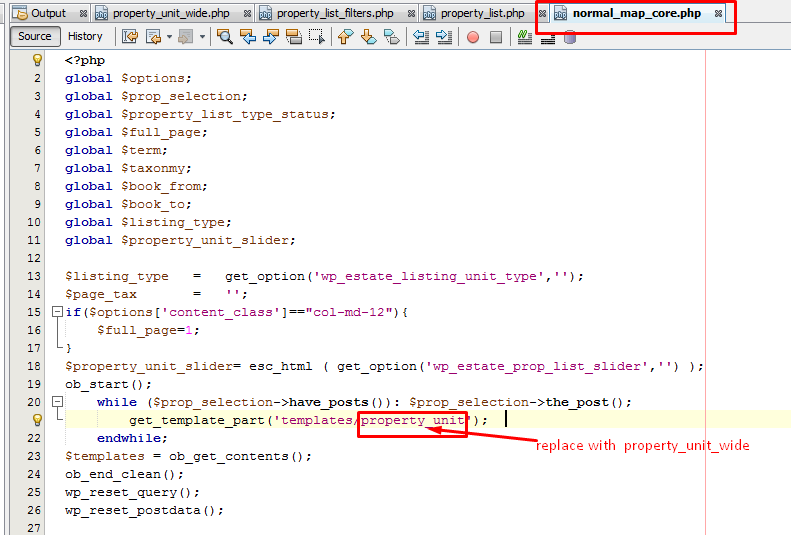
The below change will apply for lists in the theme.

The change needs to be done in wprentals/templates/normal_map_core.php  The property unit needs to be replaced with property_unit_wide as in the below screenshot.



Technical how to

Related Articles

  • How to add a new currency in Theme Options for payments.
  • How to Disable WordPress Image Compression and Preserve Original Quality
  • How to Change the Default Categories Icon from Listing Card Unit
  • How to change the background color and logo for admin login page

HELP CATEGORIES

  • 71. General
  • 102. Installation & Basic Setup
  • 393. How Booking Works
  • 20Advanced Search
  • 18Elementor Free & WP Rentals Studio
  • 13Email Notifications
  • 14FAQ
  • 14Installation FAQ
  • 10Menu Options
  • 27Multi-Languages - 3rd party
  • 33Owner & Renter
  • 9Page Templates
  • 23Property / Listing
  • 22Shortcodes
  • 4Supported Maps
  • 98Technical how to
  • 5Third Party plugins
  • 3Translation
  • 3WordPress Blog Post
  • 13WordPress Widgets
  • 13WP Rentals Payments
  • 79WP Rentals Theme Options

Join Us On

Powered by WP Estate - All Rights Reserved
  • Client Support
  • Video Tutorials
  • WPRentals
  • WPEstate
  • API